
Searching Cases by Name
The Tipton case-list form combines the Party Name and Case Reference in one text field. Its help recommends a full first and last name. An incomplete first name can produce poor matches. Search terms are lowercased, non-spacing marks are removed, and soft punctuation acts as a separator. A name hit should be checked against the court, type, year, and case number.
- Open the Tipton Online Court Records case-list form in a normal browser.
- Enter a complete first and last name in Party Name, keeping “Match all search terms” checked for a narrow first pass.
- Select Circuit Court or General Sessions and select Criminal or Civil; both groups are required.
- Complete the Turnstile check, submit Find Now, and review the count before opening a likely row.
- Compare the court, case number, year, party role, and event context before treating the match as the intended case.
| Field Label | Type | Required | Notes |
|---|---|---|---|
| Party Name | Text, 100 characters | No | Also accepts an older case reference; full names work best. |
| Match all search terms | Checkbox | No | Checked by default; read the result count because fallback behavior may broaden matches. |
| Case Year / Number | Text, 4 / 50 characters | No | Use with the number strategy described by portal help. |
| Court / Case Type | Checkbox groups | Yes | Circuit or General Sessions, and Criminal or Civil. |
| Turnstile | Human verification | Yes | Must be completed before Find Now submits. |
The text query uses only its first ten words. Year, number, and checkbox choices do not count toward that limit. Start narrow. If the result count is too broad, refine the court, case type, year, or name rather than assuming the first row is correct.
Tipton County Portal Search Logic
The official Tipton search form shows the county portal fields and required verification.
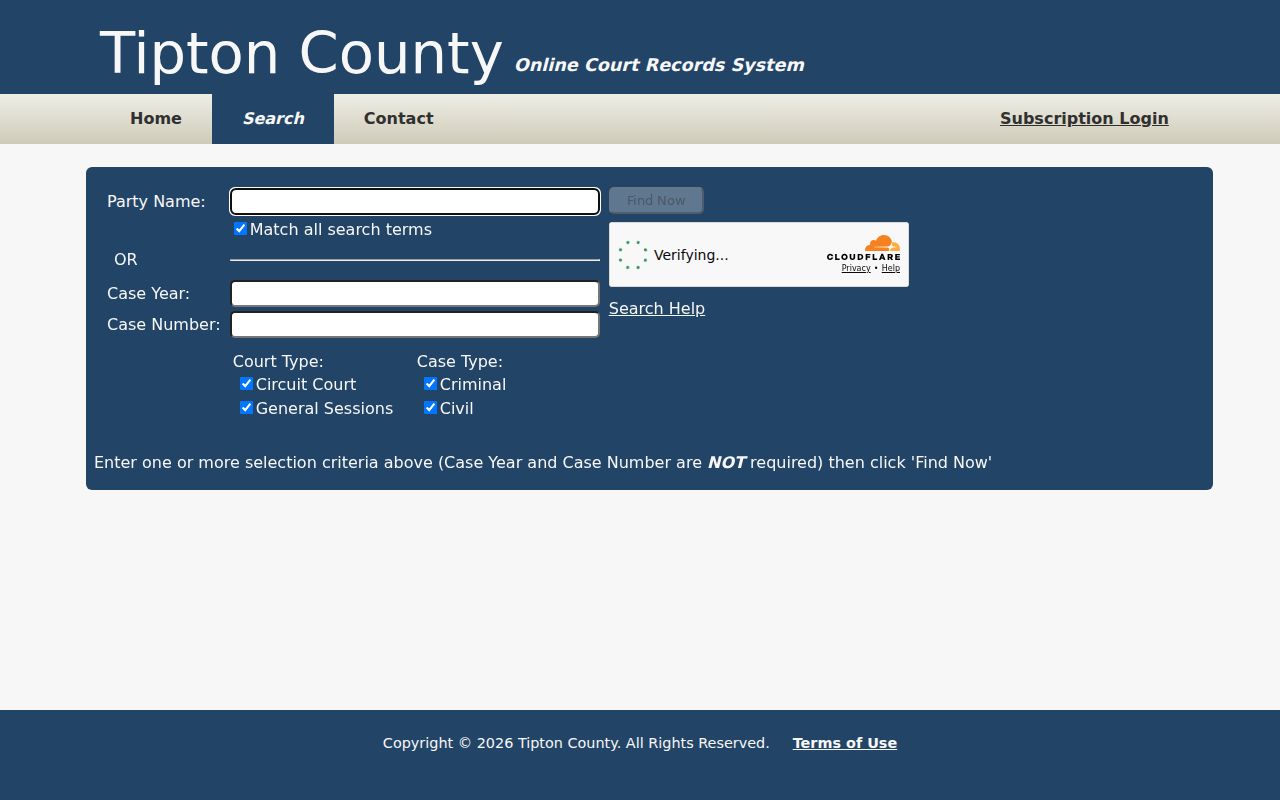
The form image grounds the instructions in the public county interface; private result data is neither needed nor shown.
The Match All option does more than its short label suggests. Portal help says all entered criteria compound. If fewer than 2,500 results return, the system may remove words from the end and add matches. That behavior makes the final count and row details important. A displayed row may not match every word exactly.
Typo tolerance depends on word length. The help describes one typo for terms of at least five characters and two for terms of at least nine. Short terms receive no such tolerance. Quoted phrases are case-insensitive. These rules can help with a long surname, but they do not replace identity checks.
Search carefully. A common-name match is not proof of identity, and a filed charge or civil complaint is not a final judgment.
Searching by Case Number
A case number is the court-assigned identifier. Tipton portal help supplies a formatted example but directs a number search toward the final numeric segment, paired with Case Year where appropriate. Because the exact public example is not reproduced in the research, do not invent local letter codes. Treat the searchable pattern as CASE YEAR + FINAL NUMBER SEGMENT.
Do not paste a full hyphenated number and assume each segment belongs in the Case Number field. Check the help, select the required court and case type, and search. Older records may use a case reference instead. That reference belongs in the Party Name/Case Reference field and should not be mixed with year and number criteria when following the reference strategy.
Tipton County Search Troubleshooting
A Turnstile failure, portal outage, result cap, and zero result are different problems. For Turnstile, use a normal browser and avoid repeated automated requests. For a broad search, narrow the court, type, year, or name. For no result, test spelling and confirm whether the matter belongs in the portal at all.
If online access still fails, call Mike Forbess's Circuit Clerk office at 901-475-3320 or General Sessions at 901-475-3310. The counter is at 1801 S. College Street, Suite 102, Covington. Ask whether staff-assisted inspection or a public terminal is available; Tipton sources do not promise a terminal. Confirm mail, fax, or email procedures before sending records or payment.
The official Tipton Circuit Court page confirms the Circuit route. The portal's clerk contact endpoint supplies another county handoff. Verify details before mailing.
What a Case Search Returns
Portal help confirms a sortable and filterable grid, but Turnstile prevented inspection of a non-identifying result. The safe field inventory below describes what to verify in a legitimate result or clerk printout, not a promise that each item appears online. Underlying complaints, warrants, orders, judgments, exhibits, or transcripts may require a separate clerk request.
| Case Number | The court identifier and any older case reference. |
|---|---|
| Style / Parties | The caption and party roles; verify identity with another field. |
| Case Type | Criminal or civil within the selected Circuit or General Sessions route. |
| Filed Date | The date received by the clerk, not the date of a final outcome. |
| Settings | Scheduled events that may later be reset or continued. |
| Disposition | The recorded outcome or status, which should be checked against the order or judgment. |
The grid can sort by a column header and apply a literal text filter to visible rows. That grid filter lacks the main query's phrase and typo tolerance. No export, public API, document viewer, or refresh schedule was confirmed. Ask the clerk for the named document when the index is not enough.
Tipton County Case Index Versus File
A case-search row and a complete case file are different products. The docket is a chronological event record. A filing is a document received by the clerk, while a setting is a planned court event. A disposition states how a matter or charge ended. None of those labels guarantees that a scanned document is available through the public search.
For the complaint, warrant, service return, order, judgment, or another filing, give the clerk the court, docket number, event date, and document title. Ask first whether inspection is available, whether a redacted copy can be supplied, and whether certification is needed. A transcript is separate from the docket and may require a court reporter or recording request.
Statewide vs County Case Search
The Tennessee Public Court Records System is the statewide wrapper that lists participating counties. Tipton's county instance is the local search used for its Circuit and General Sessions records. Neither route should be described as a universal Tennessee court index because the visible Tipton filters omit several court systems.
| Statewide Portal | Tipton County Portal |
|---|---|
| Routes users to participating county systems. | Searches the Tipton instance and its visible local filters. |
| Useful when the county is uncertain. | Best when Tipton and the likely court are known. |
| Does not erase local court boundaries. | Shows Circuit and General Sessions, Criminal and Civil. |
| Does not promise every Tennessee case. | Does not expose Chancery, Juvenile, or municipal boxes. |
Federal cases use PACER and the Western District of Tennessee, not TNCRTINFO. State appellate matters use the Tennessee appellate case system. Keeping the court label with a saved result prevents a county trial entry from being mistaken for an appeal or federal docket.
Tipton County Case Search Routes
A blank Tipton search can signal the wrong court. Chancery pleadings and orders route to Clerk and Master Gina D. Smith at 901-476-0209. Existing Juvenile docket questions route to 901-475-3315 and remain subject to confidentiality. City citations should follow the city named on the ticket.
Atoka provides a payment route, but payment is not a docket search. Mason has a CaseLook landing page with Record Search, Hearing Calendar, Warrant List, and Probation Search. No comparable municipal portal was confirmed for Brighton, Covington, or Munford, so their AOC-listed city clerks are the proper fallback. Do not treat absence from the county form as proof that a city matter does not exist.
Access and Restricted Cases
Tennessee Supreme Court Rule 34 presumes public access to court records unless a statute, another law, the rule, or a protective order applies. Sealed, expunged, juvenile, and protected material may be absent or restricted. A missing entry may also reflect portal scope or timing. It is not a certificate of no record.
Ask the responsible clerk whether a public docket entry or redacted copy exists and, if access is denied, request the legal basis. Do not seek a protected record merely because a name or number is known. A charge is an allegation, a civil complaint is not a judgment, and dismissal, diversion, acquittal, plea, conviction, and expungement are distinct results.
Use at least two identifiers when matching a case. Keep the source URL, date searched, court, case type, number, event date, and document title. For the exact outcome, request the disposition or judgment rather than drawing a conclusion from a name hit.
Logging a Tipton County Search
A short search log makes later clerk contact more useful. Record the exact name or number entered, whether Match All was checked, the selected court and case type, and the date of the search. Note any Turnstile or error message without repeatedly submitting the form. If rows appeared, keep the result count and the identifiers of the plausible row, but avoid copying unnecessary personal details.
When a current court date is the goal, compare the event with the Tipton County court calendar process and call the correct office. When a filed document is the goal, ask for that document by date and title. This distinction keeps a broad portal search from becoming a substitute for the clerk's authoritative record.